
-
5 tips for winter photography
 Moisture can be trapped in the camera body in the cold weather. It freezes and damages the camera. Here are 5 tips for winter photography. Keep batteries covered and close to your body since they die quickly in cold winter. Keep the lens cap on to protect the lens from snow, ice, or water. Cover the camera...
 -
6 Ways to Store / Backup Your Precious Photos
 Negatives, archival prints in photo books, shoebox Risks are high. Moisture, microorganism, bug, time, oxygen, disasters, animal, human, burglary all can cause irreversible damages. On your computer hard drive Photos can be transferred from memory card to PC with USB card reader conveniently. It is convenient to view, print, or edit photos from your computer. The storage capacity...
 -
10 Essential Photography Accessories While You Are Traveling in Holiday
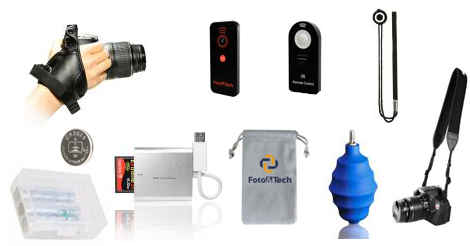 These handy nifty accessories can make your holiday trip more convenient, more enjoyable, and more worry-free! Extra Battery Never run out of power! Battery Storage Case (AA/AAA Battery Case, Rechargeable Li-Ion Battery/AA/AAA Case) Keep battery safe and organized. Extra Memory Card & Card Reader (Black, Silver) A backup is essential, never miss the opportunity to capture the beautiful...
 -
What is Street Photography
 Street photography is all about real life captured at the once-in-a-lifetime moment without any prior scheduling or setting up. There is “no props or lighting, no time for selecting and changing lenses or filters”, only “a split second to recognize and react to a happening.” The opportunity to get an amazing picture is everywhere, you only need...
 -
5 tips for fall / autumn photography
 Fall is the season that has the most abundance of colors, the season of harvest, the warm transition season between hot summer and cold winter. It is also a perfect time to take the most vibrant pictures. 1. Foliage. You can take a close up photo of a green leaf tinted with traces of red, yellow, orange,...
 -
How to set up IR wireless remote shutter release control for Sony A7R IV A7III A7R III A9 A7R II A7 II A7 A7R A7S A6500 A6400 A6300 A6000
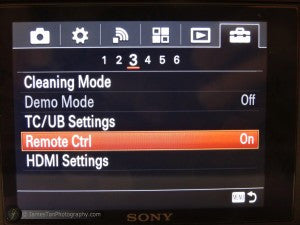 To minimize shaking, a remote control is often necessary in many cases such as macrophotography or astrophotography. This Foto&Tech Infrared wireless remote control for Sony Alpha Series is small in size, easy to carry, and affordable. Powered by a CR-2025 3v battery, it works perfectly by transmitting infrared light signal to the camera. Check out this video:How to Set Up Foto&Tech IR Wireless...
 -
Mirrorless - a large sensor in a small body
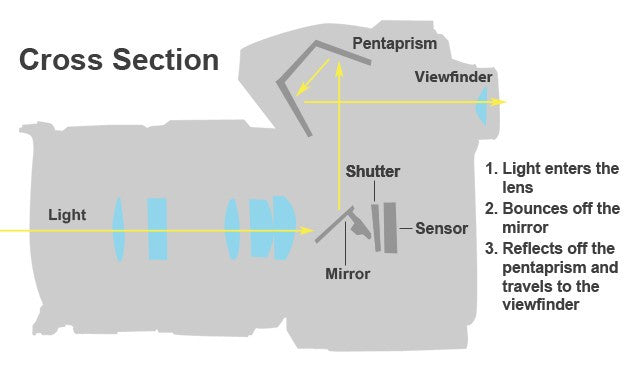 A mirrorless interchangeable lens camera (MILC, or referred to as a "mirrorless camera") has an interchangeable lens without a mirror reflex optical viewfinder. It is designed to have the advantage of smaller size, lighter weight, and lower cost than SLRs, while users can still swap lenses, unlike most compact cameras. It will not break your bank or cause any type...
 -
Halloween photography tips- pumpkin
 1. Design and carving: Make holes as big as possible so more candlelight can get out. 2. Lighting: Try adding flashlight to avoid smoke. If you use candles, cut a hole on top back to act as a chimney. 3. Camera: Hold it as steady as possible (best with a tripod and shutter release remote control). 4....
 -
How to set the remote control on Nikon D3300 D3200 D3000
1.Remove the plastic separator from the battery. 2. Press "i" 3. Select "s", then press OK 4. Select " wireless remote", press OK More reading: Wireless Remote VS Wired Remote How Infrared Remote Trigger Works How to set up IR wireless remote shutter release control for Sony A7II -
How to Use Foto&Tech IR Remote Shooting HDR with SONY A7II, A7 ,A7R
Foto&Tech IR remote for Sony works when you're in Continuous Bracket Mode for HDR photos. Please remember to enable the remote in the camera menu. Open the rear menu by pushing the Display Button on the wheel or the Fn Button. Select the cont. shooting / timer menu option in the top right. Your icon might look different depending on how you've set it. Scroll down...
Welcome to Foto&Tech
NEW PRODUCTS EVERY WEEK!